
Archil is one of the few storage services which actually stores customer data, as opposed to just delegating that responsibility to S3. This is the key thing that allows us to provide low-latency writes (1-2ms vs. 100ms+), but it means that we need to do a tremendous amount of engineering to ensure that data is stored safely in our service. Let's talk about what goes into data safety.
Measuring data safety
We measure how safely data is stored as a "durability percentage". Data durability, like availability, is measured as a "number of nines". Availability represents "the percentage of time-periods over the course of the month/year in which the service was up and serving customer requests". Durability, on the other hand, reflects the probability that some unit of data will still be readable after 1 year. It's important to note that the unit of durability is different for different storage services.
For example, if you're using EBS, durability is "4 9s for the whole volume", meaning that there is a 99.99% chance that after 1 year, the volume that you stored data on is available.
S3's published durability numbers are "11 9s for an individual object", meaning that there is a 99.999999999% chance that any individual object you store in S3 is readable 1 year after you store it. This means that, if you were to store ~100 billion objects in S3, you would expect to lose one of those objects each year.
Let's think through how we might store data on a service. The most obvious thing that we might do is write it to the local disk:
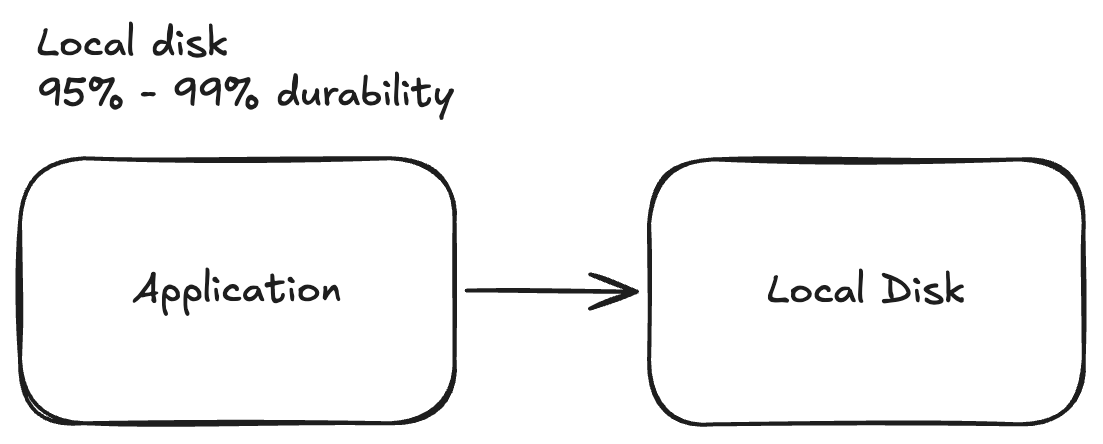
This will net us a durability for the data that we stored in the range of 95% to 99% probability that it's there in a year. We derive this from the fact that most instances in the cloud have an annualized failure rate (AFR) of 1-5%, depending on the cloud and instance type.
It's important to note that, unlike in a colo center, the hyperscalers will almost never replace part of a server for you -- preferring to kill your VM entirely. As a result, AFRs of local-SSD instances are higher because any individual component failure could lead to you losing access to your data -- as opposed to in a colo, only the SSD dying is a problem.
I'm focused on the cloud, so I'm mostly going to ignore RAID as an option and move on to
Data replication
Now, the next obvious thing that we might want to do is we could replicate the data across multiple servers. Rather than just storing the data in one server, we might choose to store the data on 3 different servers!
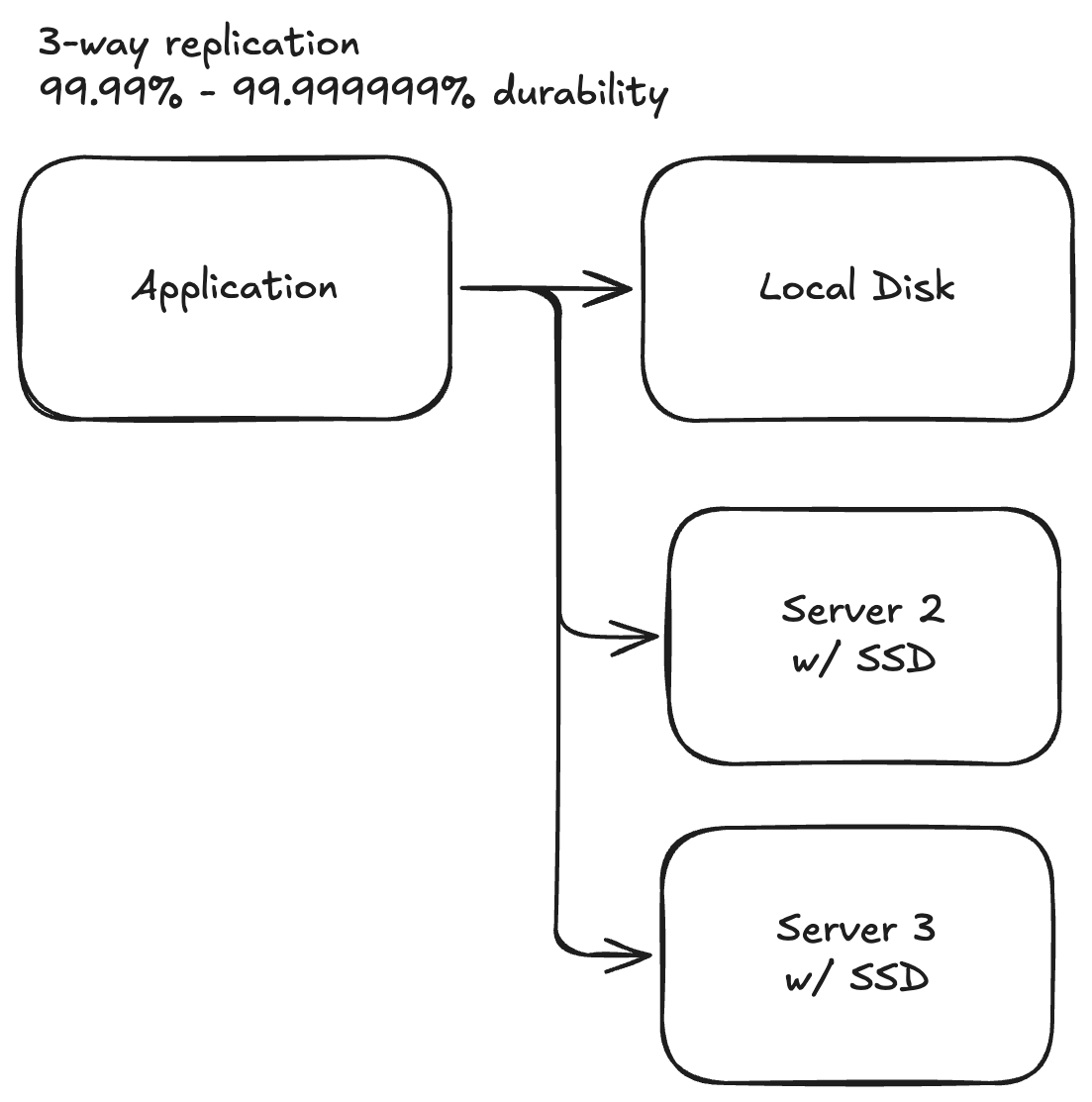
Okay, this looks great! If we consider our AFR for each server to be in the range of 1% to 5% then this means that our durability has grown to either 4 9s or 9 9s with very little overhead (1 - pow(0.01, 3)). This is great! However, we've accidentally just introduced a tremendous amount of complexity that we need to stop and think about.
First, we should think about what it means to actually write to multiple servers server. One choice could be that we actually wait for the write to durably hit the second server's disks -- meaning that only a catastrophic loss of the disk/server would lead to data loss. However, other storage services may choose to return as soon as the data hits the memory of the second server taking the bet that all 3 servers won't restart simultaneously.
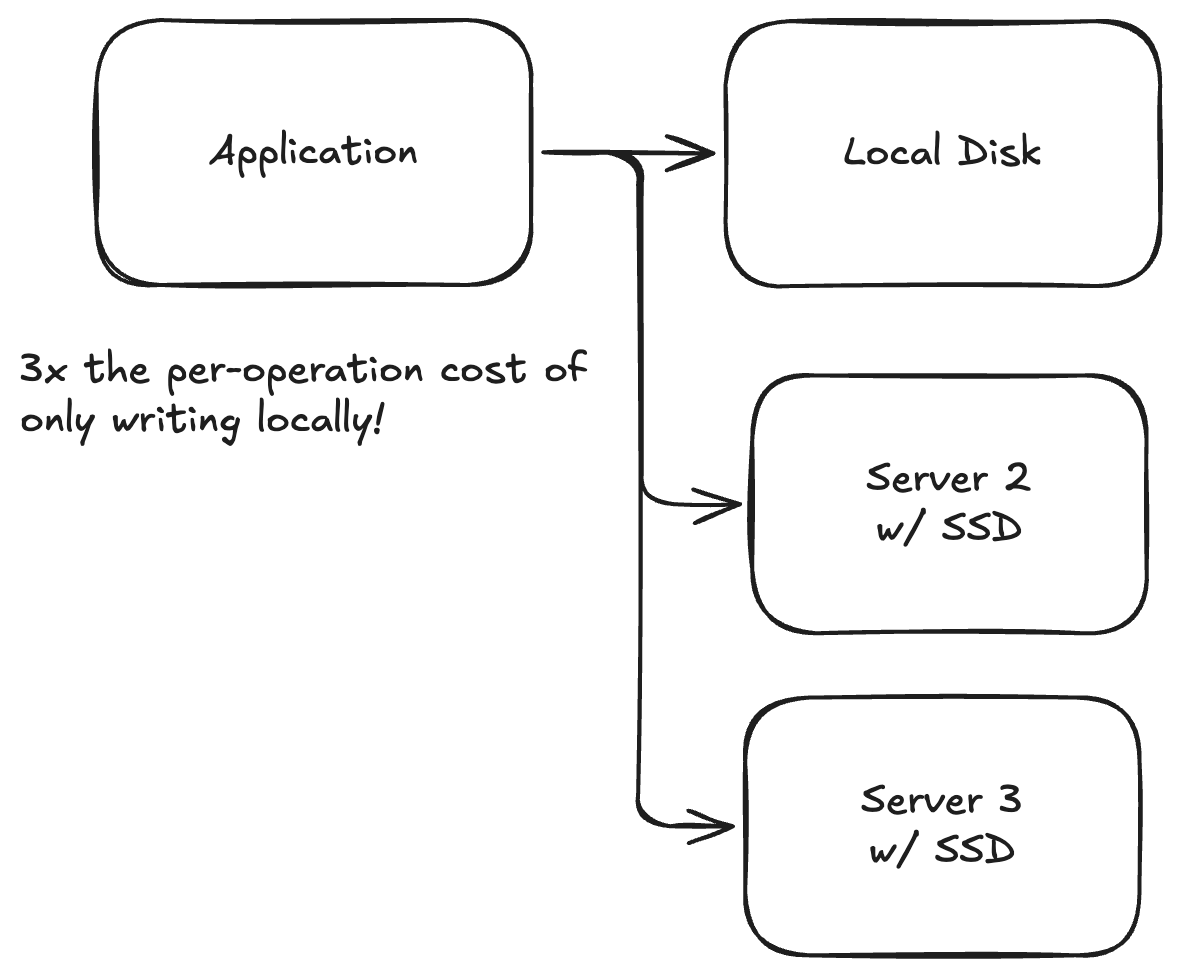
This actually matters for an unexpected reason: costs. People are always complaining about how expensive throughput and IOPS (operations per second) are on EBS volumes in AWS as compared to local SSDs. The reason here is simple: on a local SSD, you perform one write [to your local disk] for each write that the machine requests. In a replicated system, you will do 3 (in most real systems, many more) writes to underlying storage infrastructure for each application write. This leads to an explosion in costs! If you, instead of writing immediately, stash the data in-memory and write to the disk asynchronously, you have the ability to group writes to disk and potentially reduce the per-operation cost to the user.
Second, these numbers obviously assume that we never repair the servers which fail. In a real system, you measure the durability by comparing the "mean-time-to-failure" (how long it takes on average for any given failure to happen) to the "mean-time-to-recovery" (how long it takes your system to recover from the failure). We only lose data if we have three failures in a row without successfully recovering one of the servers.
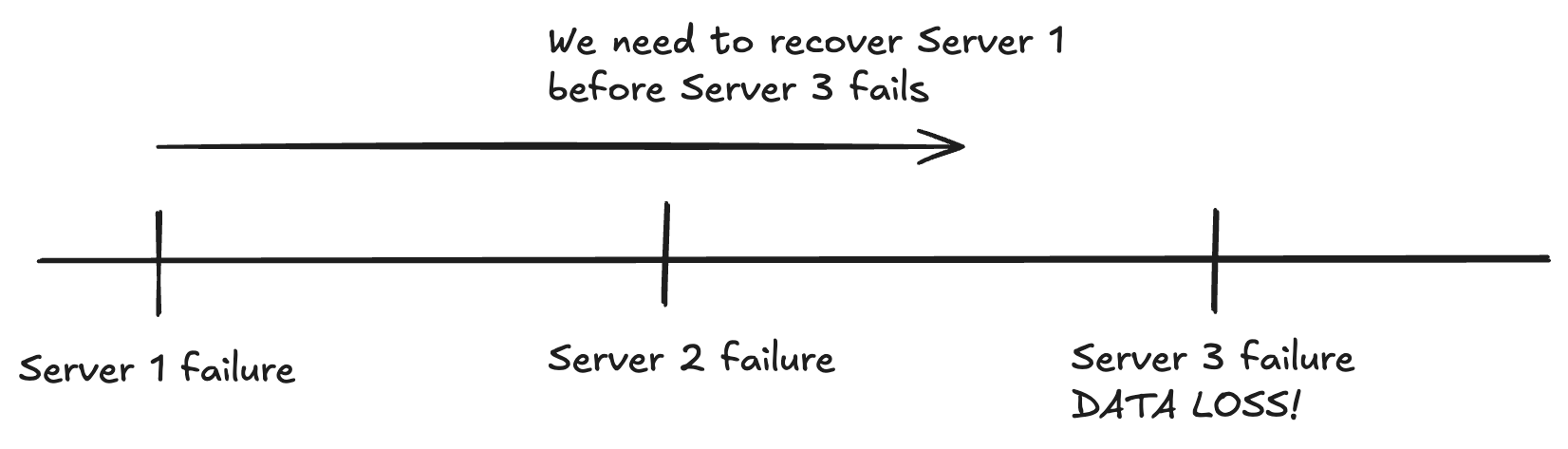
This will make our durability numbers look better (about 8 to 10 9s for the AFRs that we're considering), and it's one of the key reasons why storage services (unlike compute services like sandboxes) need active maintenance in order to stay alive. Recovering from these failures cannot always be automated away, and sometimes require operators to come in and fix.
Third, we should think about what the purpose of writing to these servers is. The goal here is to consider each server failure to be an independent probability events (so we can use pow(0.01, 3) to calculate the probability of all servers failing in the same year.
It turns out that this second property is quite hard to achieve. If you're in the cloud (again, some things are different if you run the infrastructure yourself), there are lots of reasons why VMs will fail -- including in correlated ways. Consider the architecture of AWS:
-
Your VM could fail because the SSD on the host has gone bad, or the CPU has gone bad, or the networking card has gone bad.
-
Your VM could fail because the rack itself has lost power from one of the power shelves, or networking from one of the network shelves, or because the rack actually lit on fire (yes, this does happen).
-
Your VM could fail because the data center loses power and your server does not restart correctly, or because a drone hit the data center (me-south-1).
The first kind of failure is what we think about when we calculate pow(0.01, 3), but it turns out that correlated failures are the insidious killers of data safety.
For example, if the probability that the data center lights on fire [causing total loss of our servers] is closer to 1% a year, then our real durability is actually set to 99%, regardless of how many copies we store in that data center.
As a result of this, it's really important that we pick where we located our three servers in order to maximize the safety of the data. One non-obvious thing: if you launch smaller instances on the cloud, it's possible for AWS to colocate all of your instances on the same physical server! Very bad.
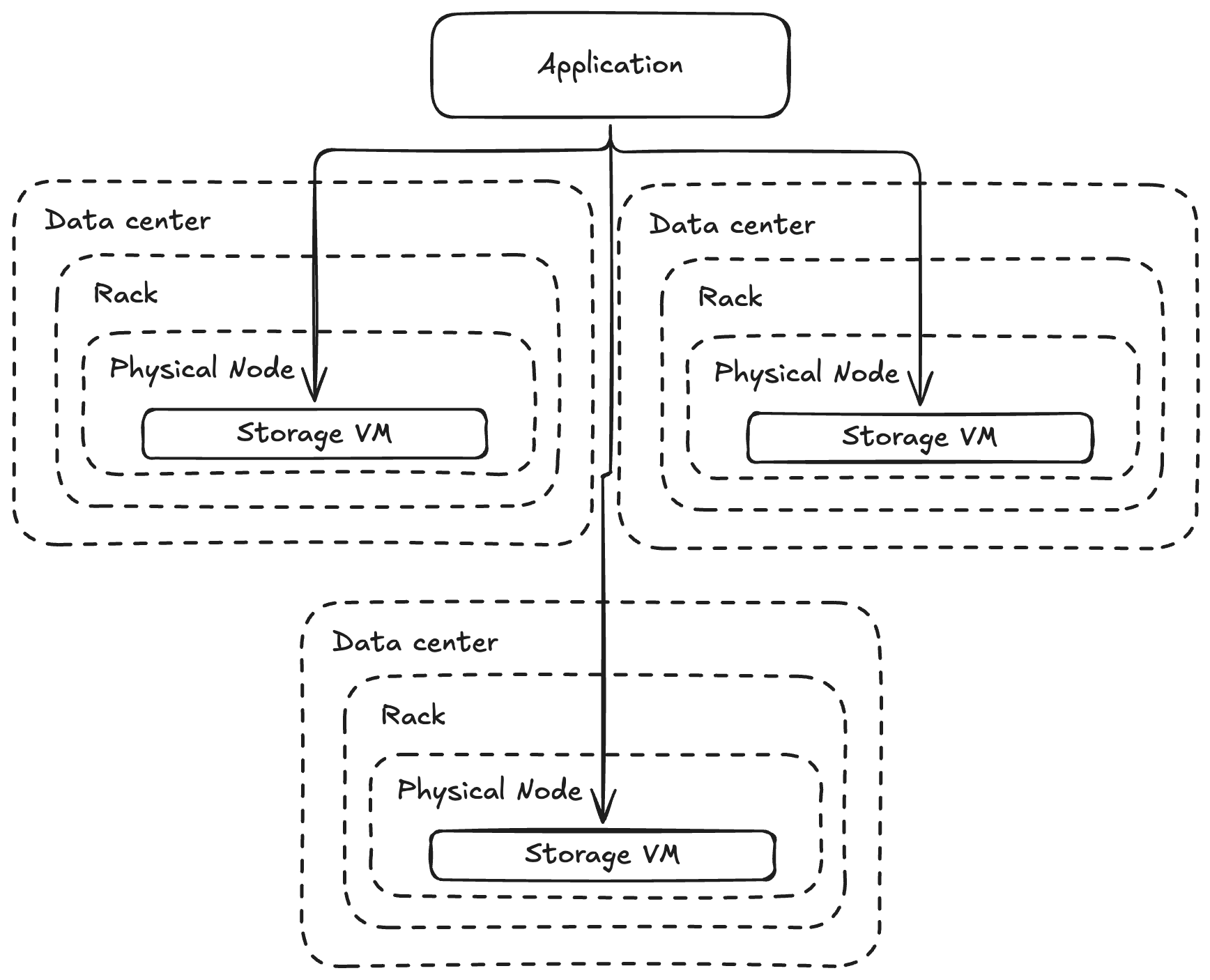
We want to make sure that the three servers that we store our data on are: absolutely on different physical nodes, probably on different racks (to avoid correlated failures from rack-level things like switches and power), and ideally in different data centers (so that our data can avoid a drone strike).
Okay, now we're getting closer, but there's still another class of failure that we need to consider. What if there are bugs in the physical hardware or software itself? For example:
-
What if a certain class of SSD ends up throttling reads and writes severely when it reaches end-of-life, preventing you from being able to read from the disk, impairing recovery?
-
What if a BIOS bug in some versions of the hardware actually prevents some servers from ever starting up after a power loss event?
-
What if you have a major capacity expansion and so the majority of your servers come online at the same time, and end up having much higher than expected AFR in the first few weeks of life?
These are all also real failures that people running at-scale storage services need to think about! It's also why the team that manages which servers data actually gets written to ends up being larger than many companies at hyperscalers. This is a crazy important problem, that if you get wrong, can completely tank your durability model and end up in customer data loss.
This is also why I really recommend people use the hyperscalers for raw infra, even if they're more expensive. At least if you care about data safety and service availability. They have data centers with the most power redundancy, fire suppression systems, and the most people thinking about hardware validation before releasing it into the compute pool. You will have more issues if you go with a cut-rate provider, and this will mean that your software needs to handle a higher rate of failure.
Erasure coding
There's one last thing to touch on for this section, which is that 3x replication across servers is usually good enough for single-tenant services [like metal databases] where individual customers can occasionally lose data and it's okay because: it only affects the single customer and that customer is usually already taking backups in this circumstance.
It is not good enough for multi-tenant storage services where losing data could impact thousands of customers simultaneously -- and storing 3x the data for each byte is usually undesirable. For this, we need to get higher replication properties at a lower cost. This usually requires that we reach for erasure coding which is a specific math technique (I do not know math) that allows you to store more partial copies of the data in such a way that any N copies can come together to restore the original data.
For example, a 3x replicated data storage system requires that 3 storage hosts fail in order for us to lose data. We might want to require that a higher number of storage hosts fail, say 7 hosts, which gives us much more leverage around how long it takes to recover from a failure. We might use 11:5 erasure coding, which stores 11 data "shards" across machines such that any 5 of those shards can be used to recover the original data.
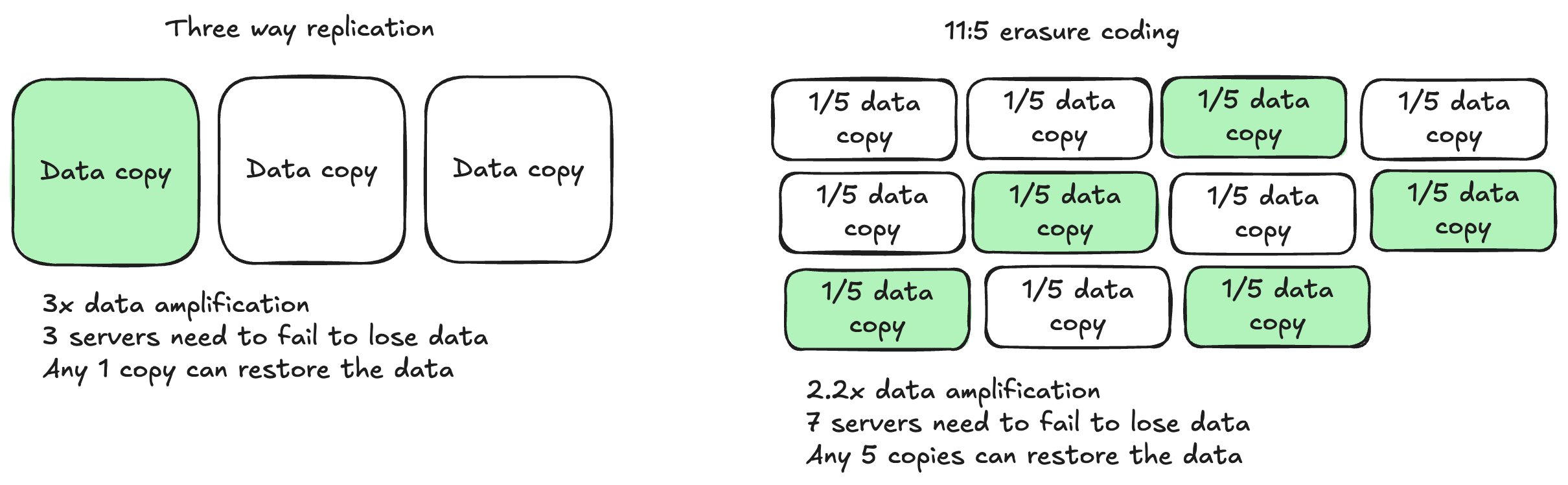
Therefore, we would need 7 rapid host failures in order to lose data. This is a pretty common technique, and I don't know the math, so I won't spend time here, but there's one more interesting thing to talk about in terms of safety.
Scaling up to multi-tenancy
Single-tenant services tend to accomplish scale by partitioning different parts of the data set across different server clusters, this is how many of the scale-out relational database services work.
Multi-tenant services usually don't have the same ability. You, of course, have the ability to shard your service and run multiple copies of it -- and this is usually desirable so that you limit the number of customers in any individual shard to limit the business impact of a failure in your cluster. However, the key benefit of a multi-tenant service is your ability to capture economies of scale by putting more and more spikey workloads on the same cluster -- eventually smoothing out the load curve.
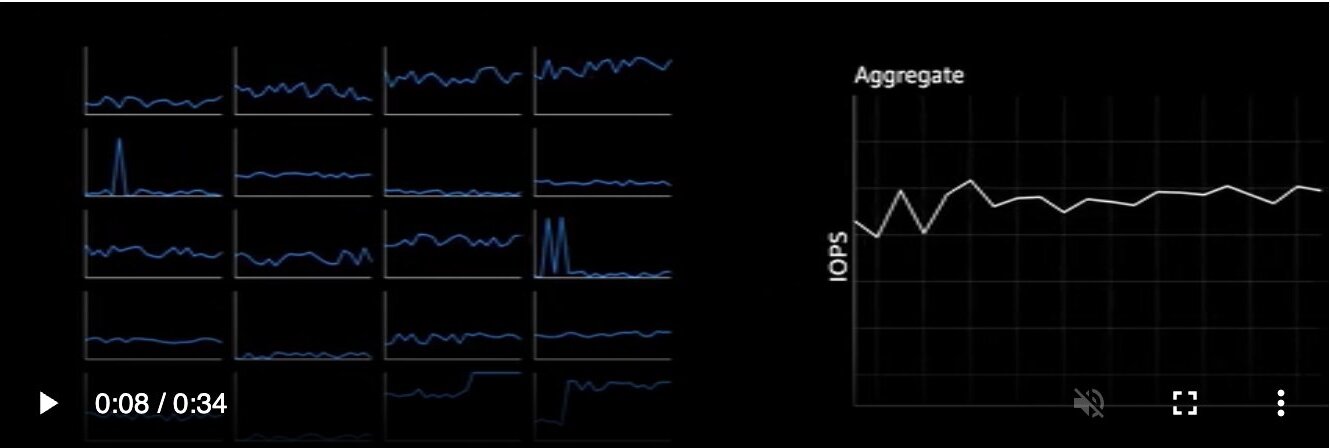
This means that, ideally, you're going to have a lot more storage servers than just 3 running. This actually creates an interesting durability property.
Let's do a hypothetical. Assume that there is some underlying hardware flaw in which 3% of your servers will permanently fail if the data center loses power. This flaw means that the 3% of servers fail simultaneously when the power is restored. Let's assume that the probability that a power-loss event happen (affecting all of your servers, which is usually harder if you're correctly going cross-AZ) is something in the order of 1%.
Now, if you have a cluster of 3 servers with three-way replication, this is basically no problem. What are the odds that your cluster will be completely affected during power restoration. Well, we need to assume that each server is impacted by the bug pow(0.03, 3) = 0.0027% and then we need to incorporate the probability that the data loss event happens at all 0.0027% * 1% is 0.000027% -- this hardly affects our durability properties at a 5 9s level!
Consider an alternate scenario in which you have 100 servers in your cluster, and your application is configured such that it has the ability to write to any 3 servers anywhere in that set of 100. In the fullness of time (as your service fills up with data), you would expect that all combinations of 3 servers in the 100 would have at least one piece of data straddling it.
Now, let's replay the scenario. You will lose data if any 3 servers out of your 100 go down simultaneously, all combinations of 3 servers host at least one piece of data. This starts to look much worse. You can calculate the probability that at least 3 servers are impacted using a binomial distribution, which leads to a 58% chance that at least 3 of your servers are unrecoverable. At a 1% event chance, this leads to only 2 9s of durability: 99.4%.
If you have success and your service grows to 1000 servers, the same probability grows to 99.9999999971%, or an expected service durability of 99% [the event happening guarantees data loss].
You can see easily how very rare failures in servers can become extremely impactful to data safety at large fleet sizes, and as a result, you need to once again rework how you think about placing data across servers. You cannot allow your application to place data across any 3 servers that it likes.
Instead, we want to constrain the places where we actually place data so that a uniform failure of servers is actually unlikely to take out a set of servers that holds customer data. This technique is known as copysets.
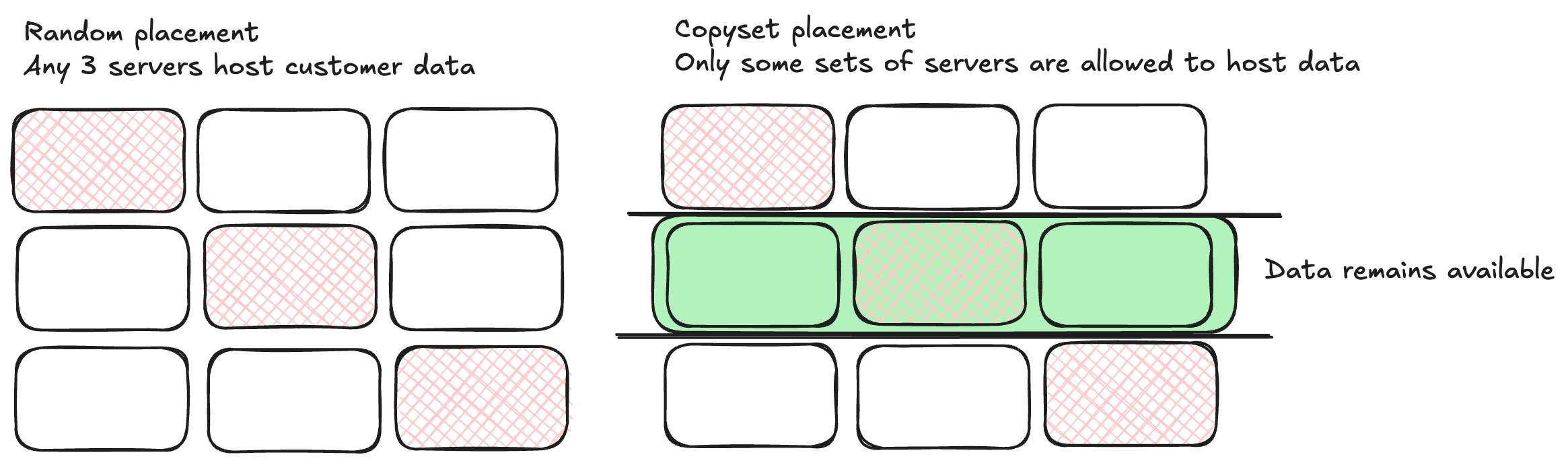
Consider our 100 hosts again. If, rather than allow our application to write to any set of 3 hosts which are available, we group the servers into 33 copysets of 3 hosts (just ignoring the extra one). Then, to lose data, we would need to lose three hosts which all belong to the same copyset. The probability that this happens is now far lower, 33 out of (3 choose 100) in fact -- 0.0204% of the time, 2900x safer than the original case -- saving the service from durability loss under many correlated failure cases.
Summary
Storing data in your service, without relying on S3, is a really, really hard problem. It's the reason why there are teams of people working on data durability at the hyperscalers, who stay up at night worrying about correlated failures, measuring things, and validating hardware.
This is the reason why many compute services do not offer durable, replicated storage. Data loss is really bad for customers, and it's better to not promise data safety than it is to deal with customers who have lost their data. I'm really lucky to have spent so much time in this space, thinking through these problems before, but make sure you know how your cloud stores data before you move your database there.