
When I started Archil in 2024, I was coming from a world of networked, disaggregated storage products. My primary goal was to build a system for file storage (which has super powers like multi-attach, offline access, and elasticity) that had the same performance as block storage, to disrupt EBS (networked block storage) as the default on-instance storage solution in the cloud.
Fast forward to 2026, and I have learned a TREMENDOUS amount about how the next generation of companies are thinking about building their applications. In particular, for infrastructure startups like @freestyle_dev, @ssh_exe_dev, and @PlanetScale 's metal product, people are starting to bet big on architectures that only use local storage. Let's dig into why this is the case, and how it intersects with us ( @archildata ) as a remote storage company.
First, let's talk a little bit about why networked block storage (like EBS) became the default for the cloud in the first place.
Before the cloud became popular, the vast majority of software ran inside of data centers or... offices. We didn't have a great set of infrastructure services to pick from. This meant that databases had to make use of technologies that were easily packable into the server itself to make the data safe.
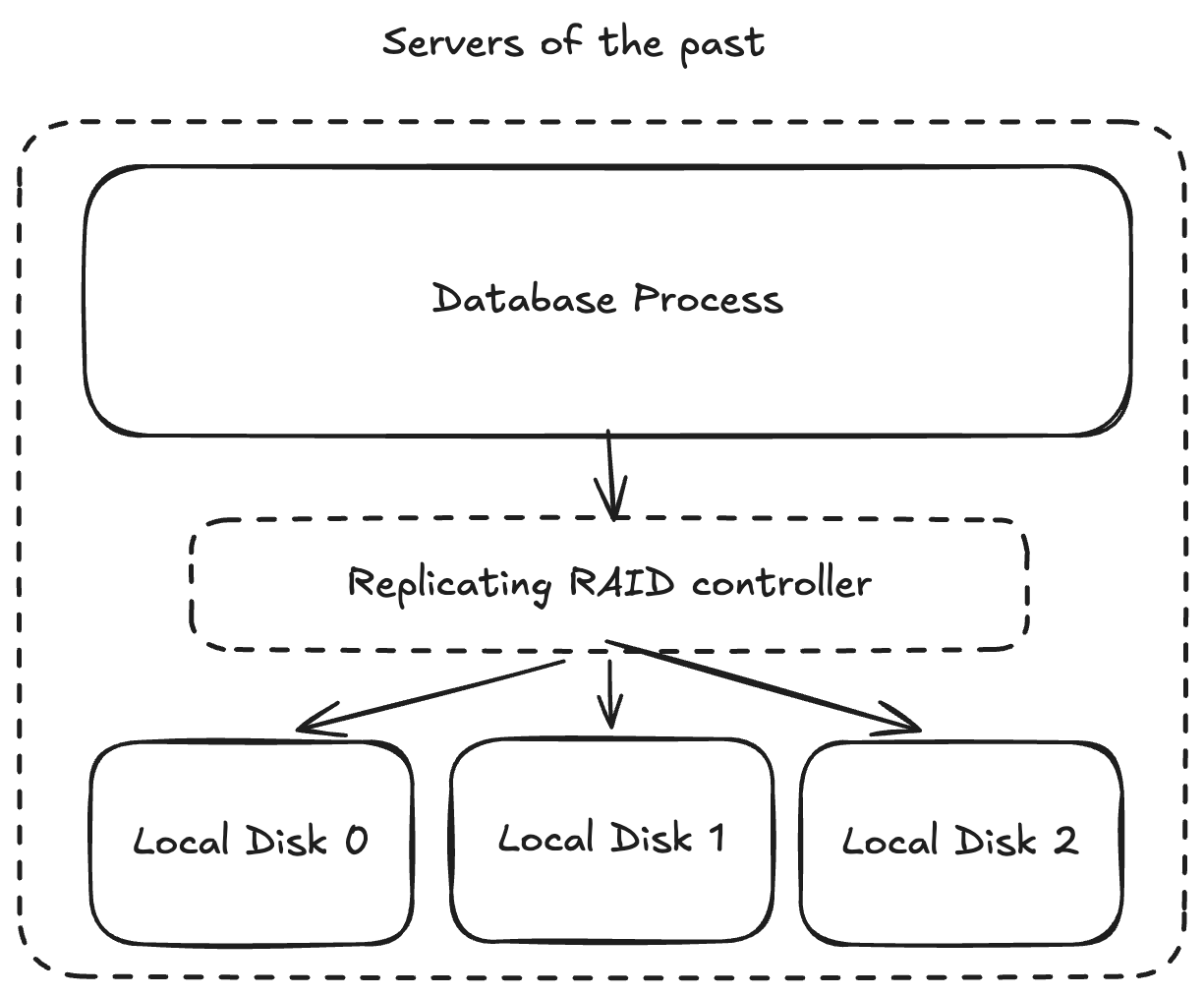
This is RAID. The database ran on a server, that server used RAID to duplicate and protect data across multiple hard disks sitting inside of the server chassis such that any individual drive failure wouldn't result in the catastrophic loss of data for the database. Higher-level technologies around replication were what created highly available, geographically distributed database services, but that's a story for another time.
When AWS starts the cloud-frenzy in ~2007, they need to meet customers were they are today -- which meant that they needed to provide a primitive that matches the semantics of RAID -- a device that (appeared) to the VM to be plugged in to local hardware but, under the covers, was doing sophisticated replication to protect that data from the loss of any individual hard drive.
The great part about what AWS did, as compared to local RAID, is build EBS as a real service, which meant that you could "unplug" the disk from one instance and "plug" it into another. You could even resize the disk up if you needed more space! These were huge improvements over what people got in the data center days.
As people like @davidcrawshaw have pointed out in his recent vision post for exe.dev, this led to us walking down some counterintuitive tech trees over the past 20 years.
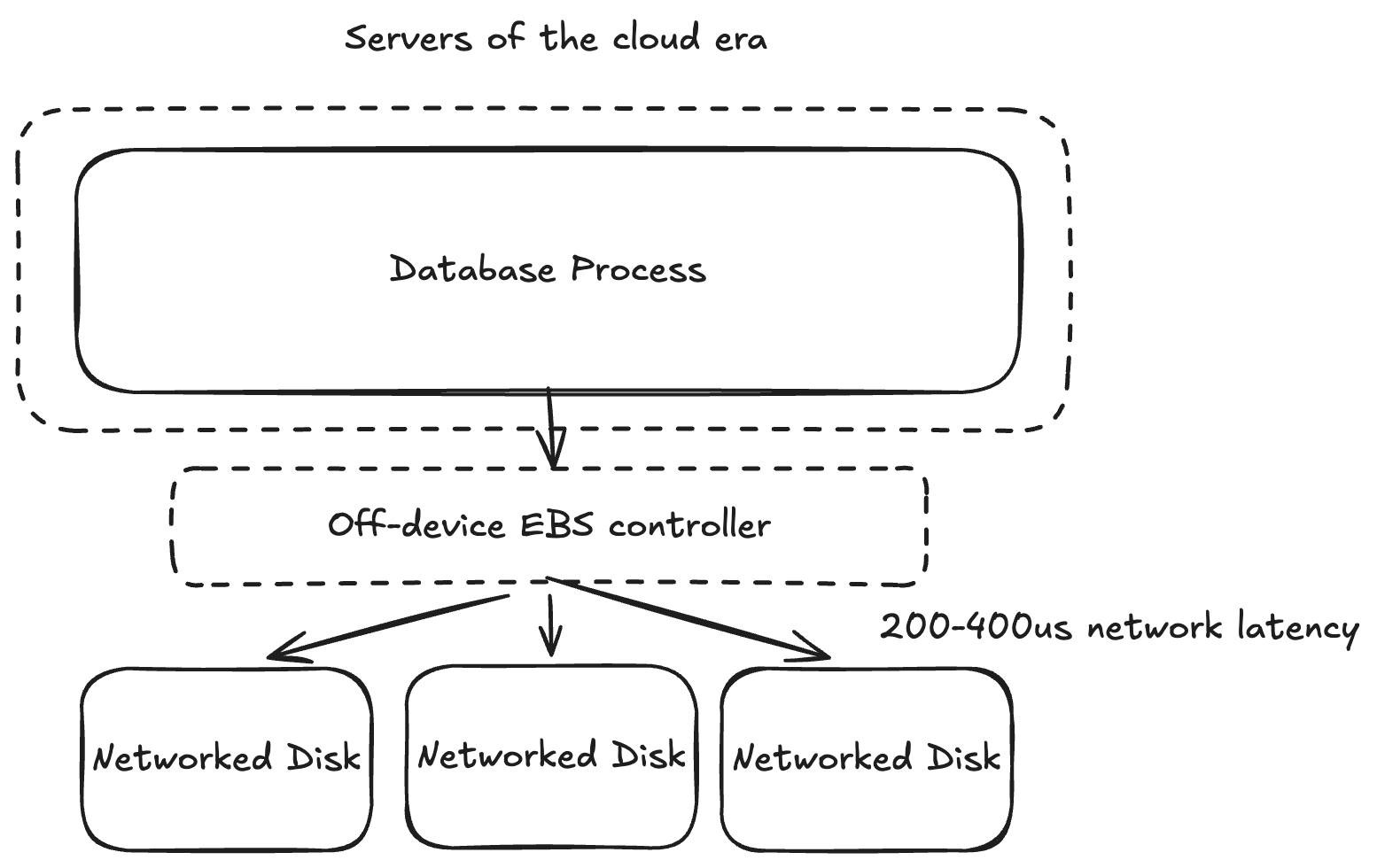
Notably, this comes down to latency and IOPS. First, these networked block devices were (of course) NOT physically plugged into the machine they were serving (you can move them around, after all), so there is some network latency (usually on the order of 200-400us in a good cloud) in order to actually get to the data. It hasn't been possible to drive this latency down in tandem with the improvements being made to real storage hardware, like SSDs, which can now do reads in something like ~10us.
Secondly, IOPS became SUPER expensive and limited. As someone who's worked on basic infrastructure margins, there's a rough mental model to wrap your mind around this. You can think of a storage device as having a fixed capacity of operations per unit-time (X). Any customer who sends an operation to that device should be charged (effectively) for 1/X of the capacity in that unit-time. However, if your storage device needs to do replication for durability purposes to 3 or 5 underlying disks, then suddenly you need to be charged 3/X or 5/X (300% more!) in order to gain durability. This creates a huge cost difference with local storage that has only been exacerbated as local SSDs have continued to drive up the number of IOPS they support.
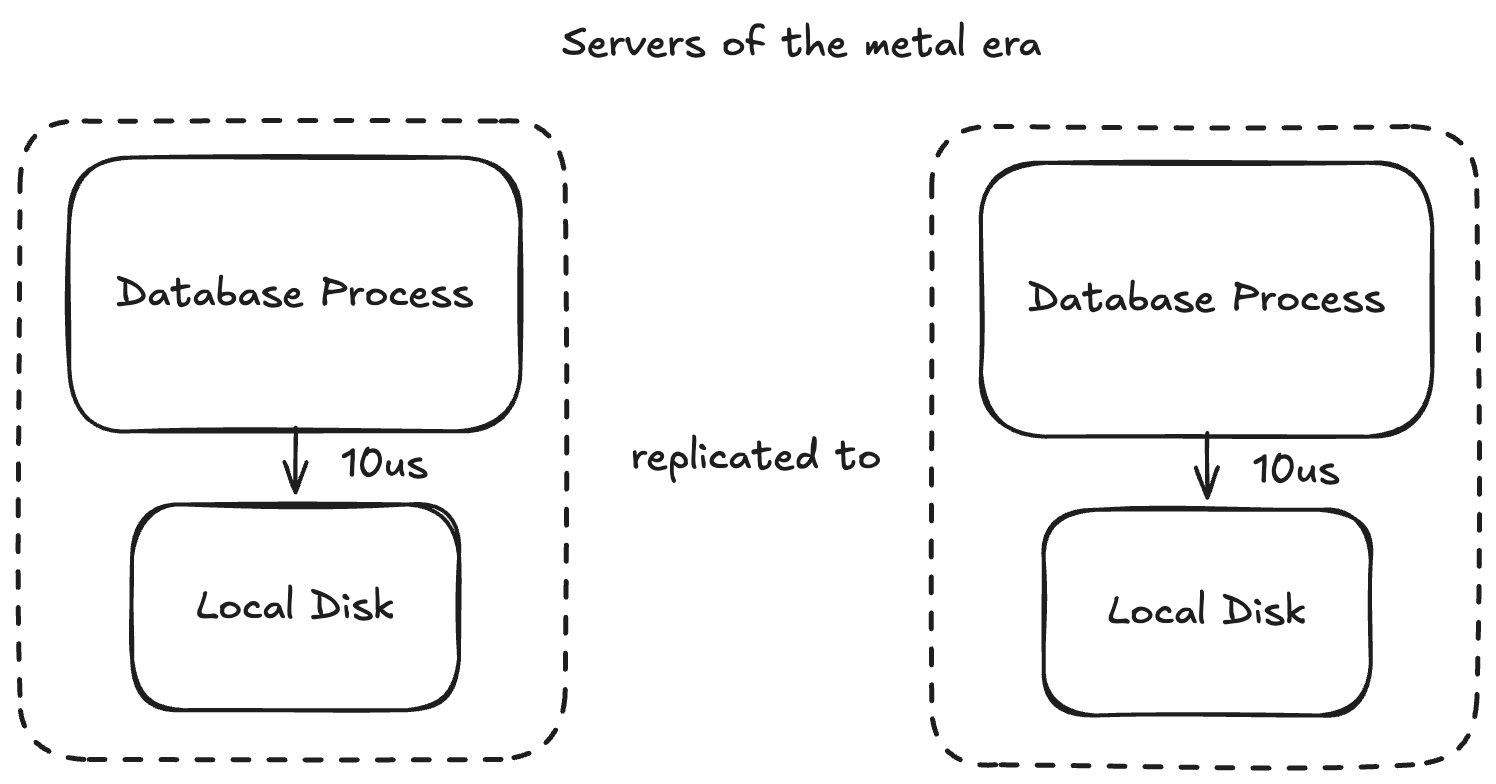
What's the solution to this problem if you're working in the infrastructure space and want to provide the best performance experience to your customers at the lowest cost? Move to local disks.
In AWS, these are the instances that end in "d" (intuitively stands for disk) or the instances that start with "i" (intuitively stands for high-capacity SSD storage? idk, i don't envy the people who have to come up with the instance names).
In this world, you pay Amazon for the local disk that's attached to the instance in full, get local (non-networked) latency to the disk, and get to use all of the device's IOPs without paying for pre-provisioning them.
There's just one... small... difference. These disks aren't durable. While EBS devices offer 5 9s of durability (you can be pretty sure the data sticks around if your instance dies), these local devices [of course] do not.
This means that your application now needs to be architected to handle the fact that individual disk failures can now occur. For example, PlanetScale Metal handles this by replicating data across multiple instances. Other services may choose to do "asynchronous replication" and offer customers durability for all data that's older than X seconds.
Now that the next-generation of companies are all building their applications in this way, we couldn't possibly get them to use networked storage like Archil, right? It turns out that there's still a way. And it's from a key insight that I've had over the past few months after talking to many of these founders:
Local storage is a special case of remote storage
Consider the database case that we've been talking about throughout this article. What happens when one of the servers that you're replicating to dies, and you need to replace the server and spin up a fresh disk? Well, you need to somehow get this fresh disk up to date with the other disks in your cluster. This often involves: launching the new server in a configuration that doesn't accept customer requests, streaming data from another server that's up to date, and only once the disk is up to date, start to accept requests from customers.
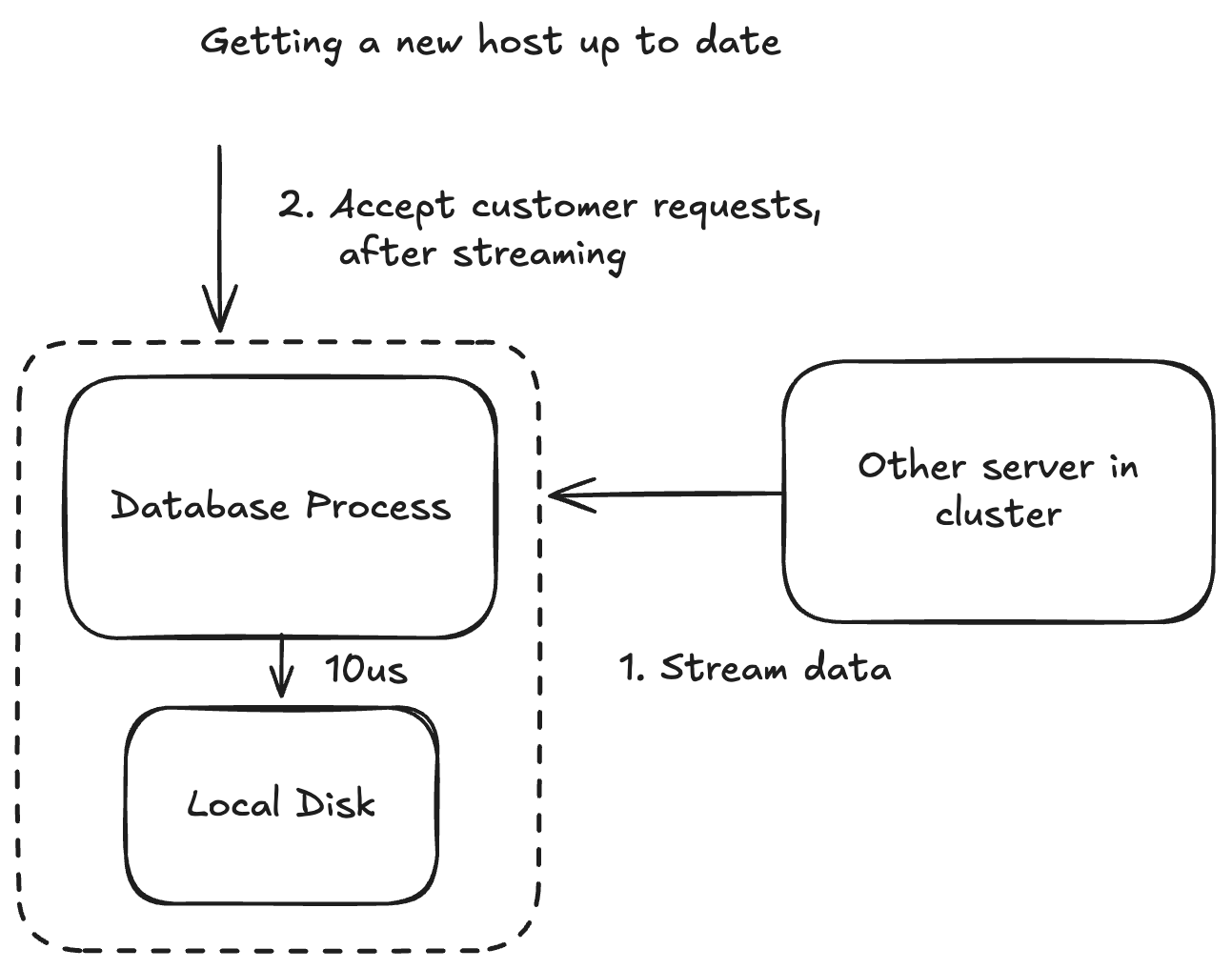
This works pretty well for services that are easily clustered, and all servers need to agree in order to make progress (like database). It might not work as well for services which only include one server (like a persistent sandbox) because it means that the customer experiences unavailability while this process is happening -- and that unavailability scales with the amount of data that needs to be replicated to the server.
No problem, you think, there's an obvious solution to make recovery an O(1) operation in the amount of data stored. Rather than forcing 100% of the data to be local in order to start the service, we will pull it down asynchronously and then (if it's not local) fetch it from the origin server.
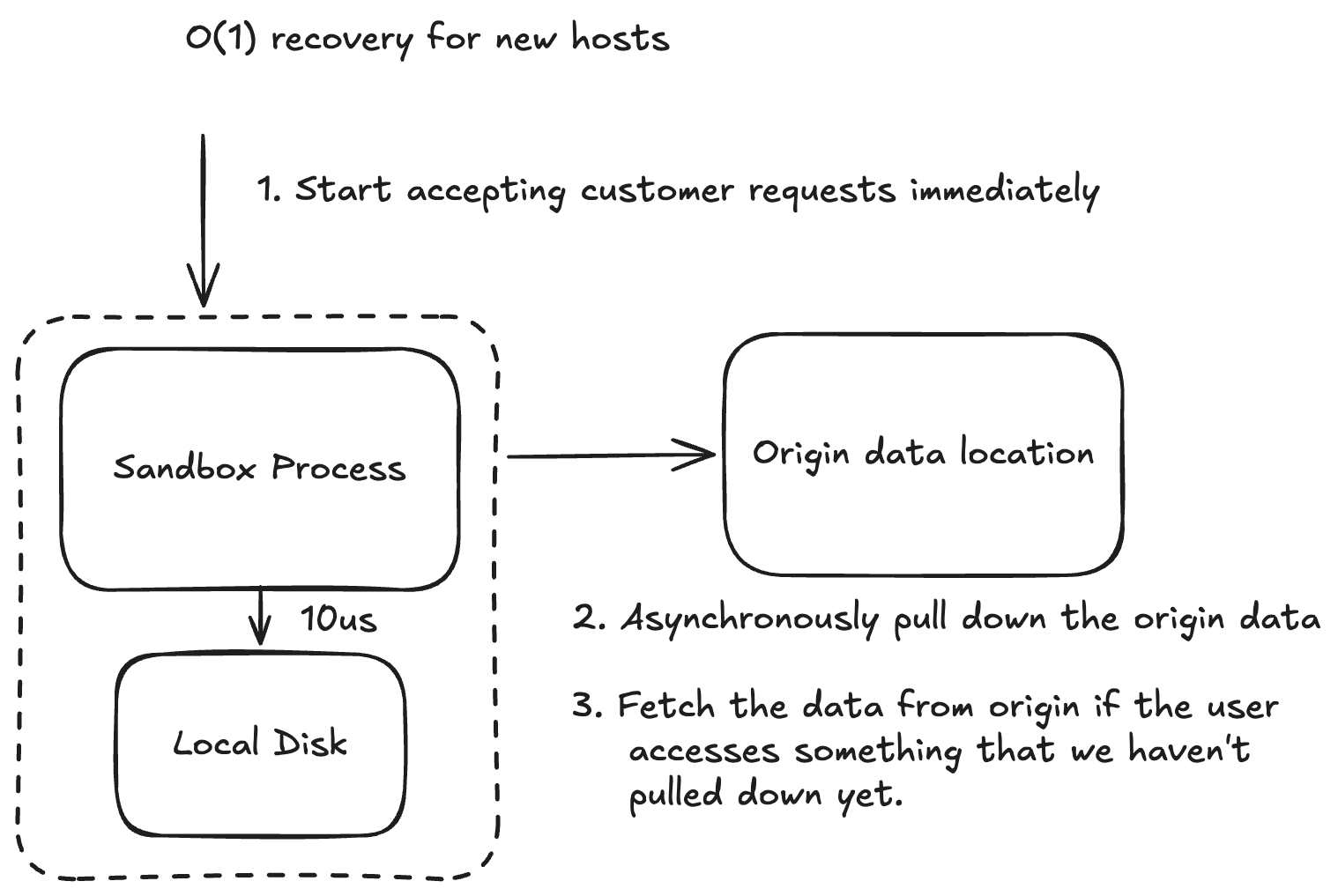
This is starting to look a whole lot like a remote storage system, isn't it! "But, Hunter," I hear you saying. "What about writes? I don't want my writes to need to wait to go to the origin data location, because is going to slow down my customers."
Sure, we can talk about that. We've already mentioned that if you're using a local disk, you're okay with managing the risks of data loss yourself. This is hard for me to accept as someone who has spent years building out 11 9s durable storage services, but let's go with it. What if we just told your customer that the write was done once it hit your local disk?
Interestingly, this also solves our IOPs problem from the EBS block storage days. If we accept the fact that you don't need every write to be immediately durable, then we can wait for enough writes to come down the pipe to make a remote IOP worthwhile without paying the exorbitant cost of the clouds.
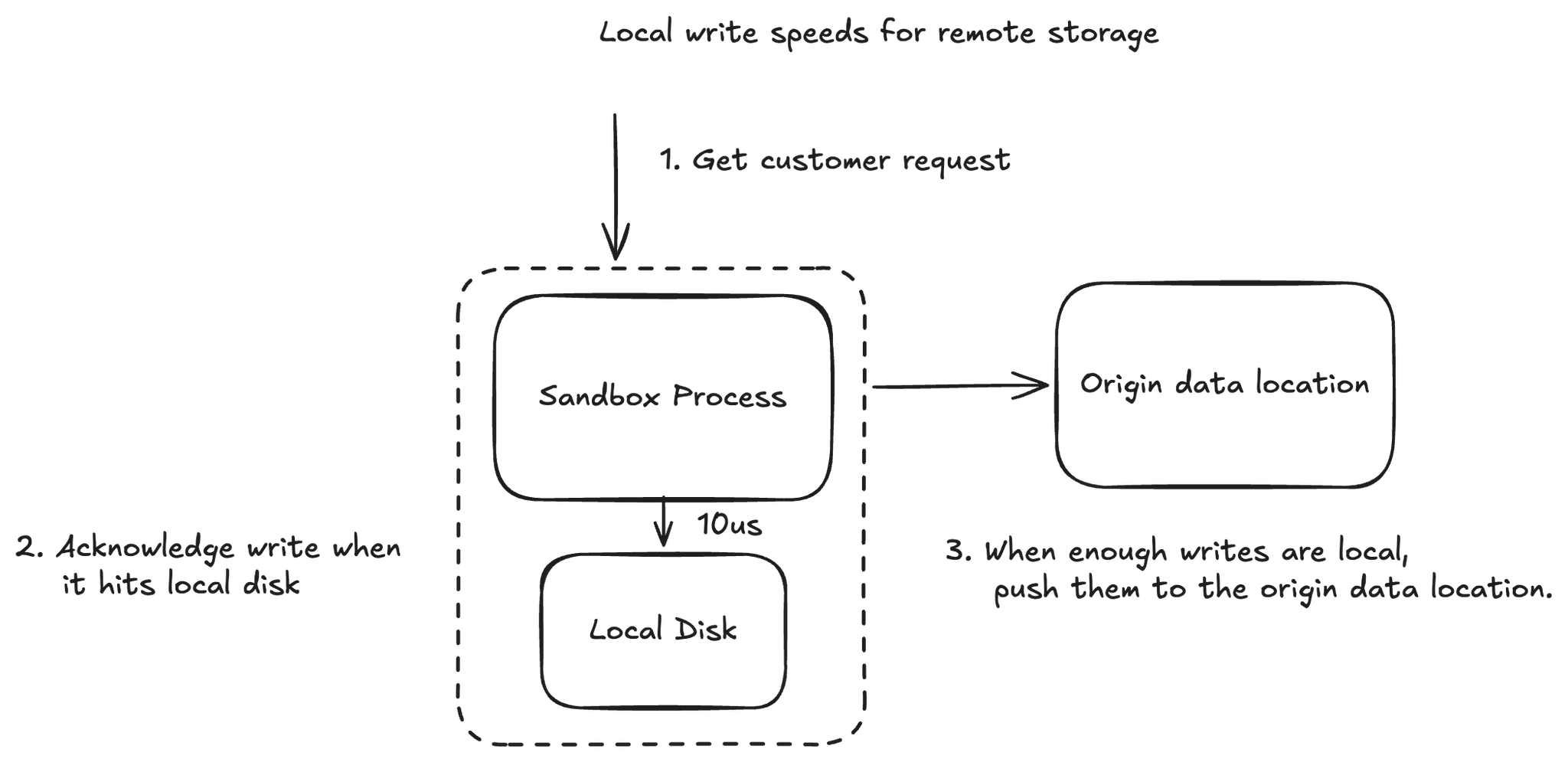
Just like that, I hope that it becomes clear. Local storage is a special case of remote storage. It's a special case where 100% of the data is resident on the disk, and where writes are acknowledged before they hit the backing data location.
This is, secretly, how many applications are built today. A service will download a file from S3 (synchronously, waiting), then operate on that file (locally), then when the operation has completed (batching IOPS), upload the entire output file back to S3.
Now, notably, there are some real benefits to using remote storage. It gives you a path to paging data remotely if you're working with data that's not on the disk. It also gives you a path to faster recovery by attaching your remote disk to a new server if you need to catch it up -- or offline access.
This helps us to hone the way that we think about positioning new storage solutions like Archil for the performance and cost conscious. It's not our job to force customers into building worse systems that they currently have by pushing expensive, durable IOPS onto all kinds of applications.
Instead, we think about how customers can give us more semantic information about how they're using their storage so that we can better optimize for their specific circumstances and application. If a customer tells us that they want a path cached fully locally, then we're happy to do that. If they want to synchronously wait for that caching to finish so that they get deterministic local read speeds, we're happy to do that too.
We don't currently support the ability to acknowledge a write that has hit local storage and not gotten to Archil's durable storage layer, but it's something on our roadmap that we're working with several providers on.
As a result, we think of our job -- as a remote storage service -- of one in which we work to get the data that the customer wants as close to their application as fast as we can. If they can tell us about when and what data, that only makes our job easier. And, yes, it means that we can make remote storage work as well as local storage.