
It's now clear that the file system (or databases stored on file systems, like SQLite or Postgres) is the way that AI is going to interact with data in this new era. However, the "file system" is still a super misunderstood technology -- in my opinion, because the industry hasn't spent the time making the file system developer-friendly during the 2010s.
Because of this, when people say "file system", they could mean a real file system like:
-
XFS or ZFS running on a local machine
-
NFS or Lustre running on a remote machine
Or they could mean something that's usually not a file system, like:
-
S3 object storage (not a file system)
-
Box or Dropbox (not a file system)
-
Or a homegrown solution on top of a database like SQLite or Postgres (not a file system)
Let's talk about what a file system is, and let's start by looking at the one that's inside of your laptop.
Block storage
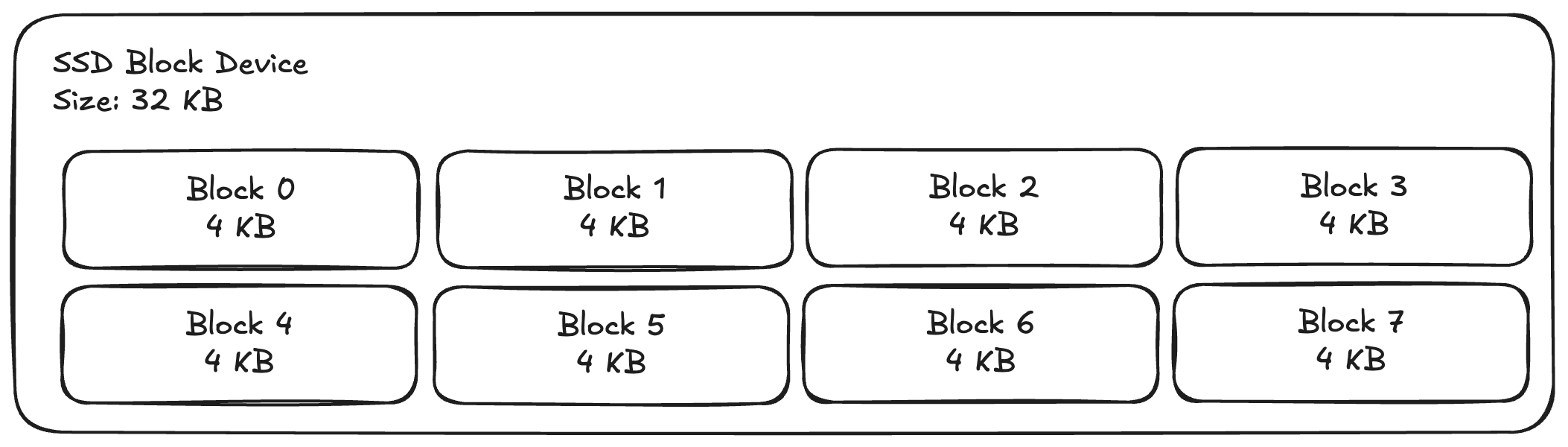
Your laptop, your phone, and sometimes your server have direct-attached storage devices -- these days usually an SSD, but it could also be a spinning hard disk. These are known as "block storage devices" because you can think of them as a literal array of fixed-size buckets of data, usually 4KB wide.
For example, this is what a 32 KB block storage device with 8 blocks of 4 KB each, totalling 32 KB of usable storage.
The interface that your operating system has to interact with these devices is really simple (obviously eschewing many many things):
-
getLength() --> blockCount
-
readBlock(blockId) --> (data, error)
-
writeBlock(blockId, data) --> error
There are two interesting properties of this: first, the block devices has a fixed length which is known ahead of time. There is no way to make an infinite block device (though there is a way to make a block device with an unimaginably large number of blocks, which may be somewhat of the same thing).
Second is that there is no transactional semantics at all, you cannot perform conditional updates to the blocks -- meaning that it's not safe to have concurrent writers access the same block device from multiple locations. You need to ensure that there is only ever a single writer to the device, which is usually trivially satisfied by the fact that a block device is directly-attached to a single computer at a time (like your laptop).
Now, why don't we all write to the block device directly? It turns out to be super annoying to keep track of all of the metadata required to do this properly.
For example, what if you have data that is larger than 4 KB? You need it to span multiple blocks.
What if you delete data? You will end up with a hole in your array that you need to track so that you can fill it later.
How do you even find the data that you've stored? You probably need some way to keep track of which blocks hold the relevant data for your application.
For all of these reasons, we introduced an abstraction layer: the file system.
Enter the file system
Unlike the raw block device, the file system has a lot of nice properties for organizing and storing data. A file system lays out data into files (which hold actual data bytes) and directories (which hold pointers to files or other directories). The file system starts at a known place: the "root", and from that root, you're able to navigate and find all of the files on the block device that you've stored.
Some nice properties fall out of this: it's possible to enforce different security properties by having different permissions on certain directories/files and applications can organize their data in application-specific directories.
The file system that you're used to interacting with usually looks something like this (vastly simplified and may look familiar from OS class):
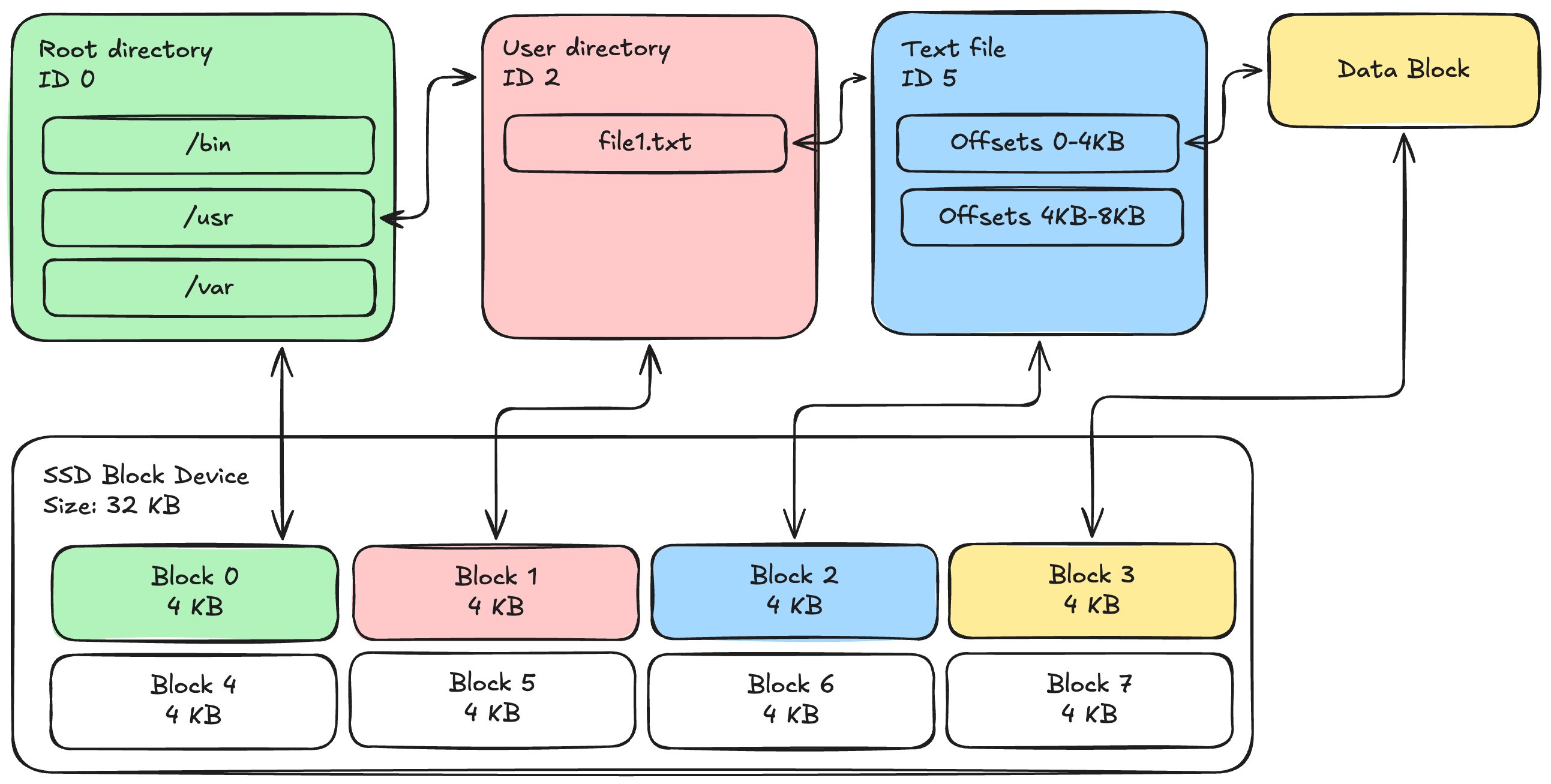
Each directory in your file system is actually an array of "directory entries" which contain file names and pointers to where on the disk the child item is stored. These pointers could be other directories or files, allowing you to create many levels of organization. Finally, files contain an array of pointers (so that the file can become arbitrarily large) to where on the disk the actual data lives.
As you might imagine, the API that you use to interact with a file system is actually much larger than what you get with a block device and it has functions like:
-
make directory / remove directory
-
create file / link file / unlink file
-
get file attributes / set file attributes
-
read from file at offset / write to file at offset
-
rename file or directory
This is usually what we talk about when we talk about the POSIX API for file systems. These functions are standardized across Linux-like operating systems, and the vast majority of software ever written (including all modern databases) store data using this API. One interesting note about this API is that there's no fixed length. Unlike a block device, you do not need to have a predetermined size for the amount of data on the file system since it's sort of irrelevant to actually using the files.
[Side note on S3: The key insight of key-value stores if that you don't actually need to organize your data. There's no such thing as directories in S3, there is a literal string key (which can include slashes) and that points to a piece of data. As a result, it's not really possible to use S3 as a file system because some operations -- like renames and partial overwrites -- are very expensive.]
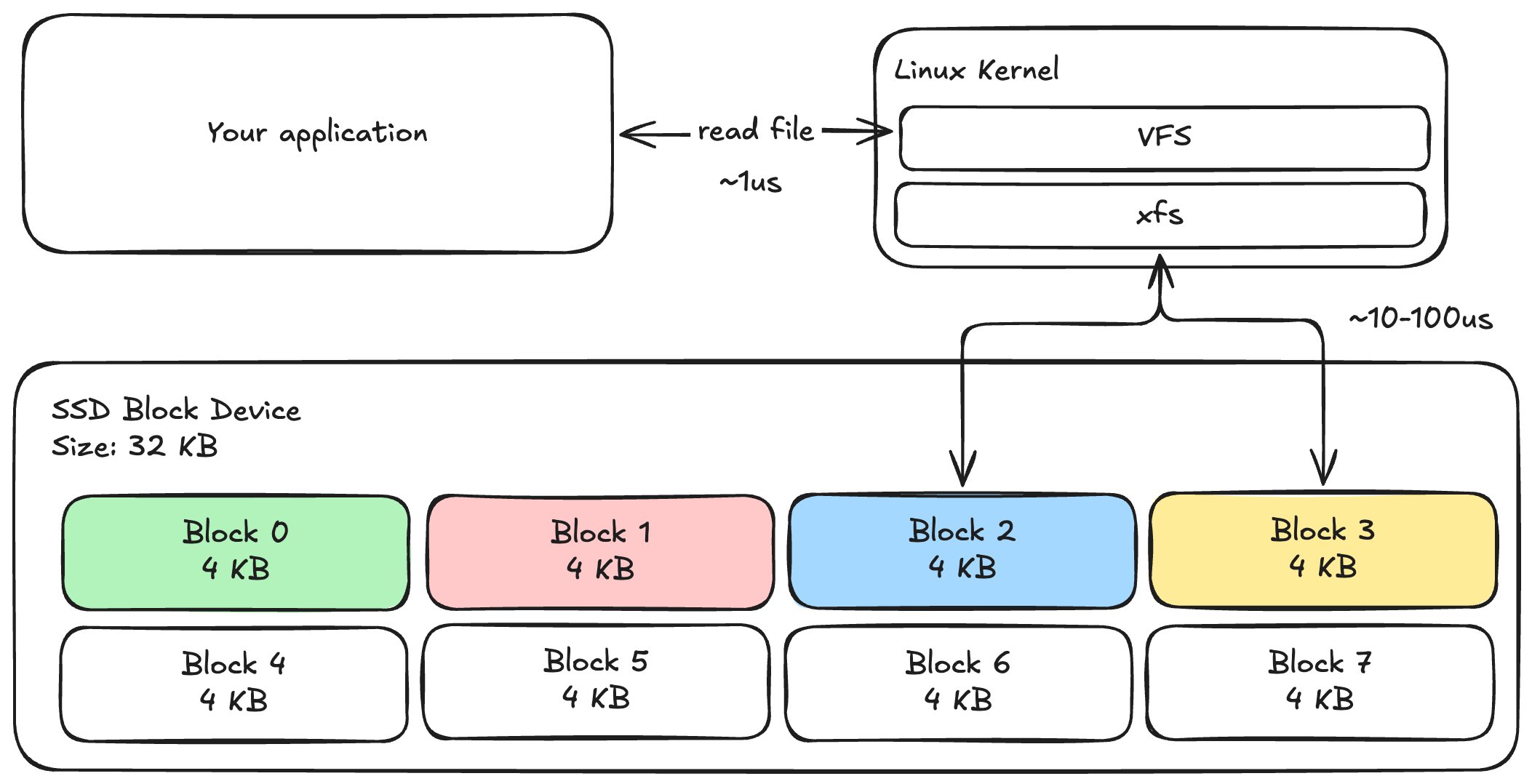
The file system code is actually implemented inside of the Linux kernel itself, and because file systems (like databases) are the story of tradeoffs, there are many different file systems that you can use. As a result, the Linux kernel implements a "virtual file system" (VFS) which exposes the API and allows it to route to many different underlying implementations. If you're using XFS and calling "read file", you might end up with a call graph that looks like this:
Now, this is all well and good for data that fits on your local disk and for applications which don't need redundancy, but the obvious question becomes disaggregation. What if you need to store really large amounts of data, what if you need higher aggregate scale than a local disk, what if you want multiple writers?
Shared file storage
The obvious next step is to basically put this file system behind a server. The server can become the single point where you can decide which client is able to do what in terms of permissions and sequencing.
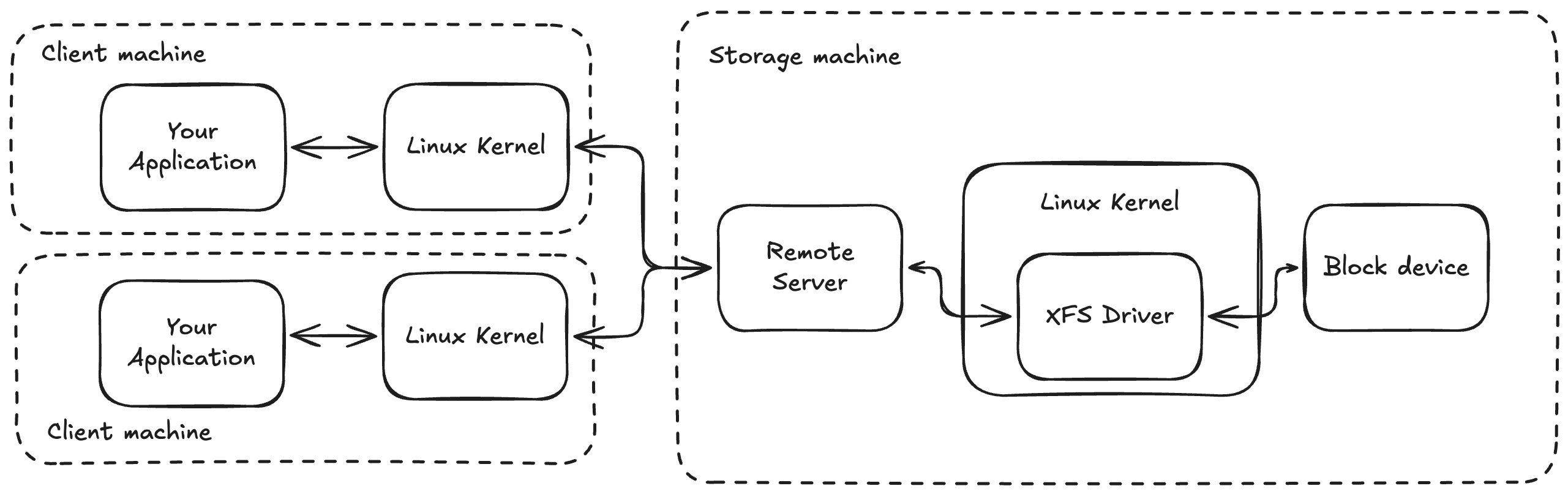
Now, if two clients simultaneously try to create "file1.txt" in the same directory, the server can do concurrency control to make sure one of the clients fails. This means that we can support multiple writers! We can also imagine more esoteric file systems (with multiple servers) which allow you to scale out throughput and operations-per-second above and beyond what a single server can do!
The problem: you've invented NFS and suddenly your application is running 100x slower than when you were using a single-writer block device. Why is that?
Why does remote file storage suck
There's a sneaky secret in the world of file systems, it turns out that [for performance reasons] you basically ~never want to actually talk to the disk.
As a result, the POSIX file system specification has an interesting additional operation: fsync and syncfs. Until you call one of these functions, the data that you've written can be lost because it hasn't actually been written to a disk anywhere -- it's just in-memory.
This is what makes database workloads so different than other kind of interactive file system operations. If you run "git clone" or "npm install", these things never call fsync, so you're actually performing a fully in-memory operation. If you run sqlite, every INSERT is followed by an "fsync", so you're actually measuring the performance of the underlying storage hardware.
This makes the remote vs. local performance very very different:
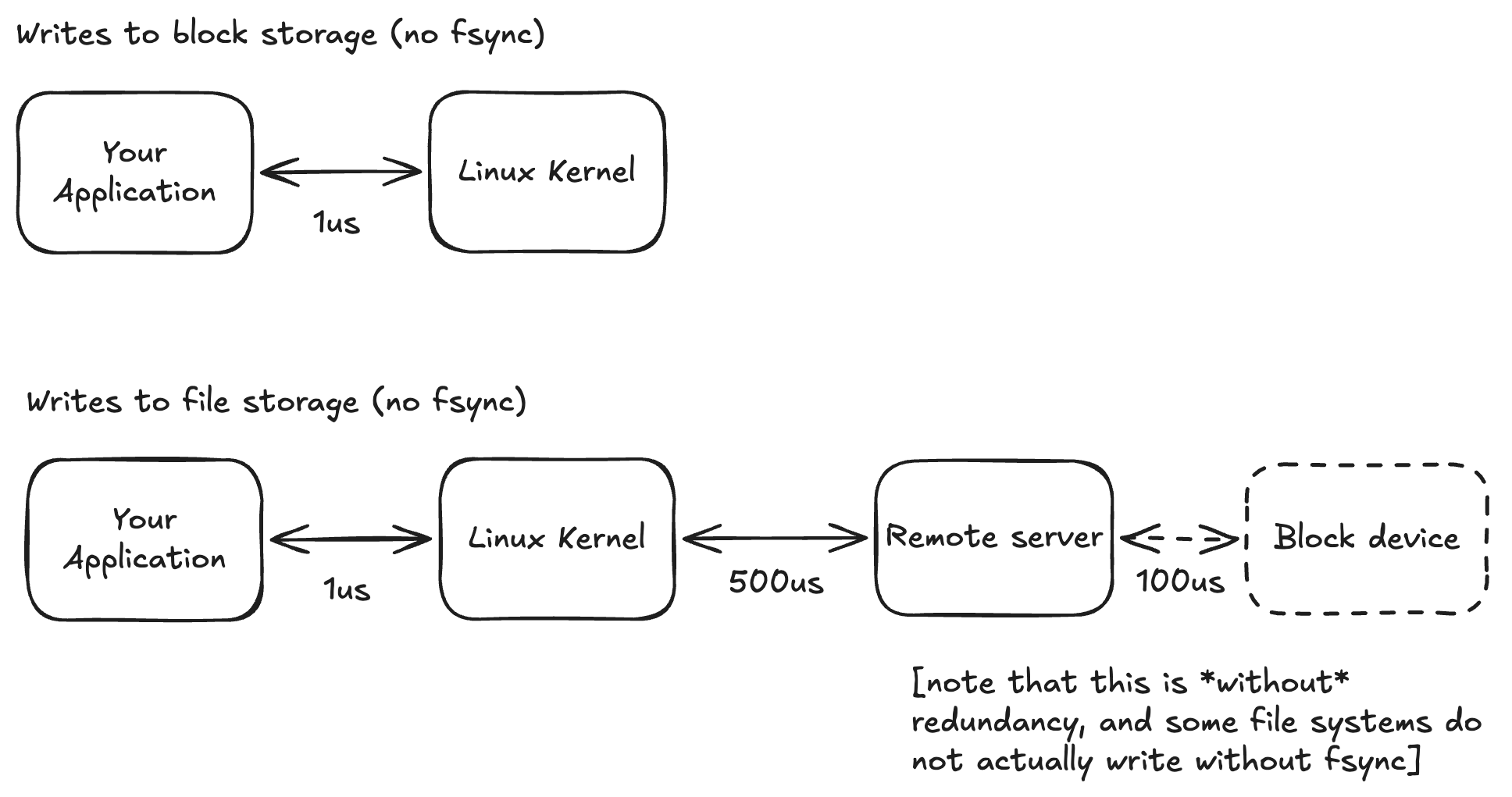
An in-memory operation to the kernel takes around 1us for the context switch, and this is all you do every time you create a new file or folder. If you are writing to a remote file system, this incurs a network roundtrip (hundreds of microseconds to milliseconds), and [depending on your file systems' durability properties] potentially a write to a [maybe replicated] block storage device.
This is required for every operation in order for the server to correctly reject conflicting writes from different clients. It's why if you try to run "git clone" on an NFS device, you see a tremendous performance reduction compared to running it locally.
So, the ability to have shared storage for application redundancy is super important, how do we [as an industry] work around the fact that shared file storage is so bad?
The answer here is simply: S3. The standard architecture that we seem to have landed on is to use a local block device for all of your working space and, then, when you're done with your work, spend time packaging it up and shipping it up to something like S3 for longer-term storage.
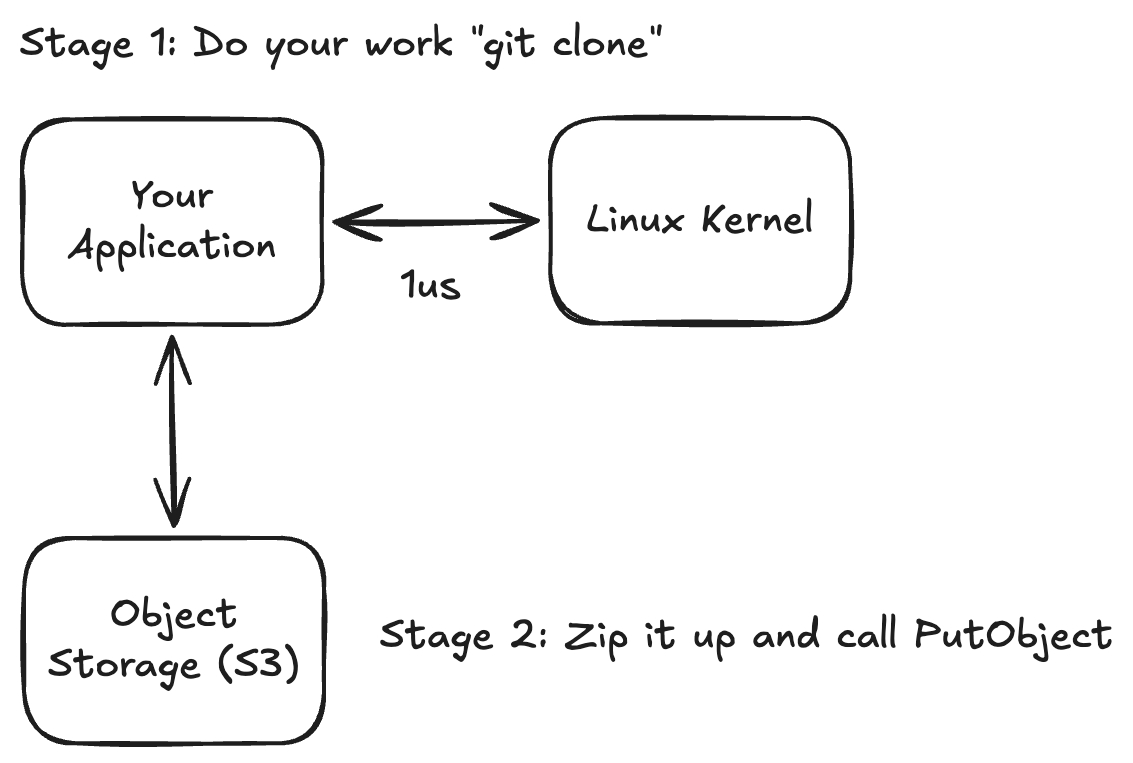
This has some desirable properties. For example, for many workloads, you don't actually care to persist the intermediate states and you just want to have the end result or nothing. This workflow makes this super easy.
However, it's not scalable at all. As your data sizes grow, the time it takes to upload your finished work to S3 grows and grows. If you need to later download that data from S3 to get started again, this time also grows. This is one of the core reasons why sandbox boot-up time will take longer depending on how large your image is -- they're just stored in S3 and need to be fully downloaded before your sandbox can start up!
There are lots of ways that people try to paper over this: special file formats that can be partially read to start up faster, local on-disk caches, etc -- but we believe that the underlying problem is just that shared file storage doesn't need to be so poorly performing.
Let's go back and look at the underlying problem:
The issue is that the naive approach requires that the remote file system do a lot more work than the local file system for each operation. But, what if that wasn't really required?
The purpose of going to the server is to avoid a situation in which two different clients can simultaneously perform conflicting operations. What if the server had a different way to enforce this behavior?
We found that most workloads don't actually require conflicting writes to the exact same file. In fact, in multi-client workloads, the clients are usually operating on different files or different directories. So, what @archildata does is that it detects what files and folders each client is working on, and allows the local Linux kernel to serve reads+writes for those files without hitting the server. If a client wants to operate on the same file or folder, the "ownership" of that piece of data moves back to the server so that the server can do conflict-detection for you.
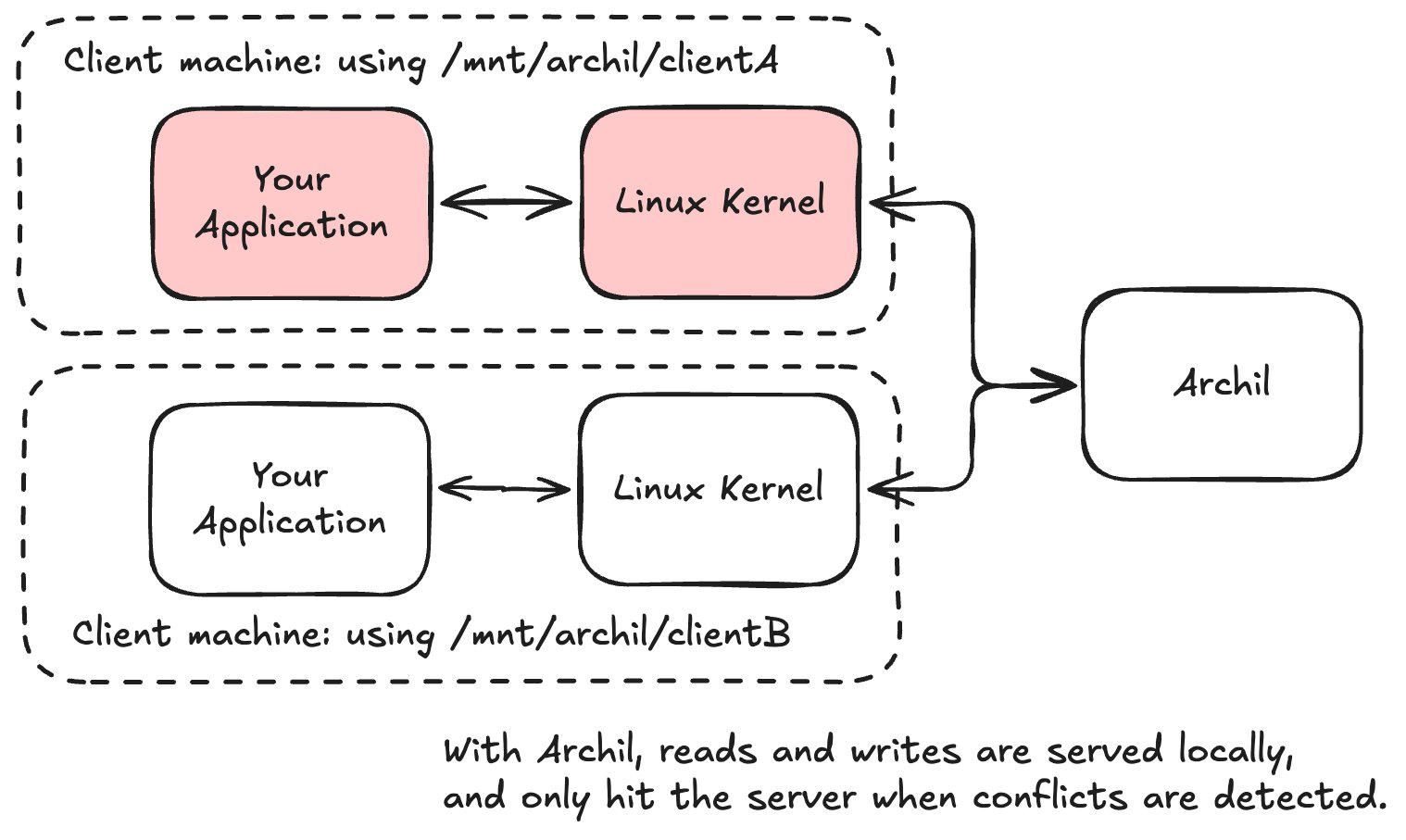
This is the core property that makes Archil up to 100x faster than other file storage solutions, making it possible to use it for primary storage where you need to run things like "git clone" or "npm install".
Our core belief is that file storage is the simplest, best way to support all applications and that there just hasn't been a performant-enough file system for developers for these workloads to flow into. Our unique ability to let files and folders transition into local ownership (matching the semantics of local storage) is one [but not the only!] of the ways that we make the product have great performance -- setting it up to be the bedrock of all data-intensive workloads in the cloud.