The naive setup for running multiple agents is to point them all at the same working directory. It feels efficient. But in reality, it doesn't tend to work out. Here's what usually happens. Two agents read the same file, generate independent edits, and then write back sequentially. The second write can silently overwrite the first. Because it's concurrent, neither agent has visibility into what happened.
It's easy for two agents to confidently march forward on contradictory assumptions. After all, it's what they were wired to do. The issue is exemplified with branch-switching. One agent switches branches mid-task and swaps the filesystem state underneath a second agent. The second agent is now analyzing code from a completely different feature.
Humans run into these collisions too, but humans are slow. We take breaks and we talk to each other. We notice when something looks wrong. Agents generate changes at machine speed with no awareness of each other's in-flight work. Their risk profile is fundamentally different. This piece covers why shared workspaces break down under parallel agents and how Git worktrees provide the right abstraction for code isolation. It also shows how that same isolation model extends to the data layer.
Why Agents Collide When Sharing a Workspace
Frontier models were trained heavily on command-line tools and file manipulation. When an agent reasons about a task, it naturally expresses that reasoning as file operations like read or execute. An agent's working context maps cleanly onto a working directory. The files present are the state the agent is reasoning about. It's a design choice made at the model layer, since that's how training data works as well.
So giving each agent its own directory mirrors how they already think. Sharing a single working directory, by contrast, forces agents to reason around each other's state. That creates the collisions described above. You're asking agents to work against their own nature. The most direct fix is to give each agent a physically separate place to work, and that's where Git worktrees come in.
Branches vs. Worktrees
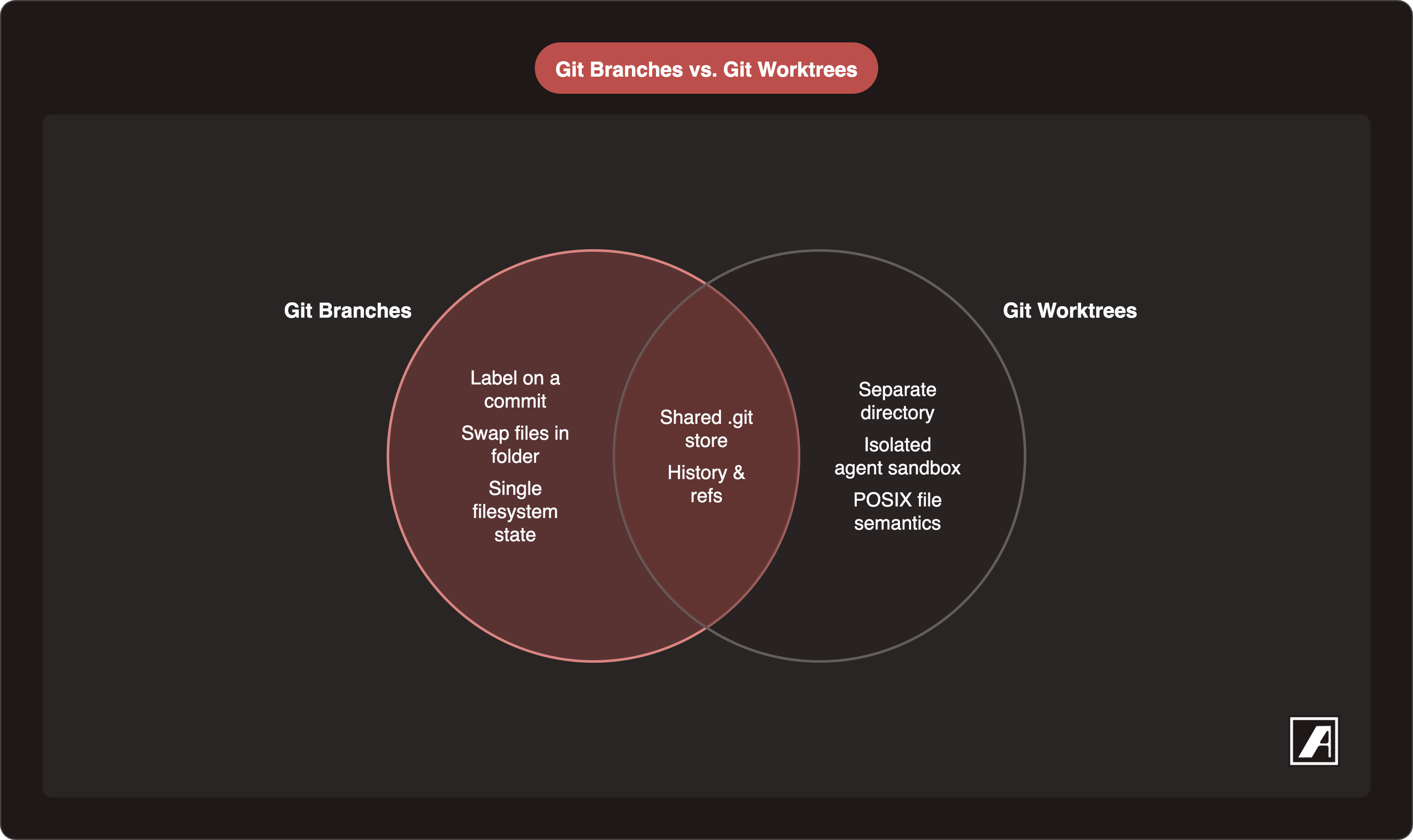
A branch is a label on a commit. It's not a separate place to work. If you have one working directory and switch branches, you swap the files in that folder. Two agents can't both use a single working directory simultaneously without colliding, which means the most obvious instinct here (giving them different branches) doesn't actually solve the problem.
Unlike a branch, a worktree is a physically separate directory, checked out on its own branch. git worktree add creates that directory and shares the same .git object store as the main repo. History and refs are all shared. A commit made in one worktree is immediately visible in the others. For parallel agents, worktrees specifically are required, not just branches. Separate branches in the same working directory still share one mutable filesystem state. Worktrees give each agent a genuinely isolated sandbox. So how can we actually set this up?
Setting Up Parallel Agent Runs with Worktrees
The basic workflow is simple. Create a worktree per agent task with git worktree add <path> <branch>. Then, launch each agent session pointed at its designated directory.
The key distinction here is task decomposition. Parallel agents pay off only when their tasks are genuinely independent. Decompose by domain or feature boundary rather than by file. If two agents must touch the same files, it's better to run them sequentially. Also, keep one human reviewer and one merge queue. Stagger merges and rebase often between them. There's no hard technical limit on worktree count, but CPU and RAM have their own constraints.
The deeper gap is that Git worktrees isolate code. Code, however, is just one of many components in a system. Agents increasingly operate on data too (structured tables, unstructured files, metadata), none of which lives inside the Git repo. An agent with a perfectly isolated code branch still shares a live data layer with every other concurrent agent. At some point the workspace design needs to extend below the code layer.
Extending the Design to the Data Layer
The same collision dynamics that pollute shared code directories show up in shared data layers. Parallel agents hitting structured tables and object storage with concurrent writes at machine speed expose the limits of manual governance very quickly.
Filesystem branches apply the same model to the data itself. With Archil branches and checkpoints, you checkpoint a disk once and fork one writable, copy-on-write branch per agent. A checkpoint takes about 15 ms and a branch about 35 ms, regardless of how much data the disk holds. Each agent mounts its own branch and can change files freely. Nothing it writes is visible on the source disk or on any other branch, and you keep the branch whose result wins.
Closing Thoughts
The underlying design across all of this is consistent. Code isolation via worktrees and data isolation via data branches all follow the same logic. Agents need stable, isolated workspaces that they can reason about as files. They don't need to know about the isolation. They just need to work in their own directory.
The storage layer underneath needs to match this interface. You genuinely don't know ahead of time whether an agent needs 1 MB or 1 GB of active cache. Full POSIX semantics matter because they allow existing code to run unmodified. Atomic renaming, file locking, memory mapping, and hard linking all matter when running parallel agents. Archil provides a POSIX file system with all of these, plus the branches described above, over data that lives in object storage. For more information, check us out here.